
NetworkingOngoing
Z-Forge: Zero Trust Network Access
A low-cost, open-source Zero Trust Network Access framework for small and medium businesses, built on OpenZiti.
- Role
- Final year project, individual
- Stack
- OpenZiti, mTLS, AWS EC2, Laravel
The problem
Most small businesses still control network access with MAC address binding: a device is let in if its hardware address is on a list. That stopped working once Windows 11, iOS and Android began randomising MAC addresses for privacy. The address a laptop uses today is not the one it uses tomorrow, and anyone can copy an allowed address in seconds.
The usual alternative, a VPN, has the opposite problem. One login opens a whole subnet, so a single compromised laptop can move sideways through the network.
Zero Trust Network Access (ZTNA) fixes both: every connection is checked against a cryptographic identity bound to the device, and services stay invisible to everyone who is not allowed to reach them. The catch is that commercial ZTNA platforms are built for enterprise teams. Small businesses often have one or two IT people covering everything, and DNS changes, layered policy engines and command-line identity management are a lot to ask of them.
Z-Forge is my final year project: a management system that puts an open-source Zero Trust overlay behind a dashboard a small IT team can actually run.
How it works
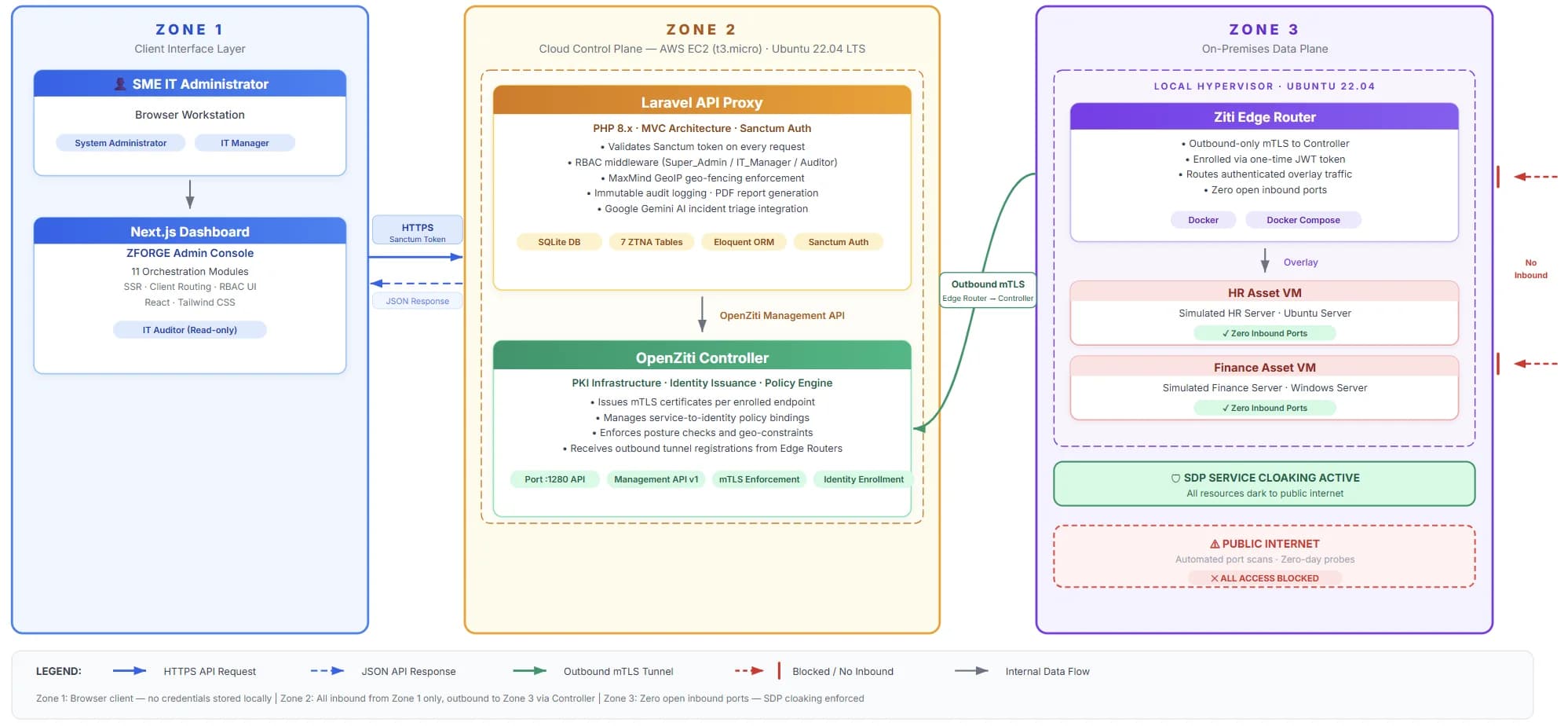
Z-Forge is built on OpenZiti, an open-source Zero Trust overlay network, and splits the system into three zones.
- Zone 1, the administrator's browser. Nothing to install beyond a browser.
- Zone 2, the control plane on AWS EC2 in the Malaysia region. It runs the OpenZiti Controller (which issues every certificate), a Laravel API that sits between the dashboard and the Controller, and the Next.js dashboard. Nginx terminates TLS 1.2 and 1.3 in front of all three.
- Zone 3, the office. An edge router enrolled on the fabric keeps an outbound-only mutual TLS tunnel to the Controller. Company services are reachable only through that tunnel. No zone opens an inbound port towards another, and the services themselves have no listening port on the internet.
What I built
Eleven modules across fifteen dashboard screens:
- Identity enrolment. Creating an identity returns a one-time enrolment token, shown with a QR code for phones.
- Device management. Rotate a device's keys, reset its enrolment or reset its MFA.
- Access policies. "Who can reach what" rules, drawn as a simple diagram so they can be read at a glance.
- Geo-fencing. Allow and block countries on a map.
- Resource provisioning. A three-step wizard registers an internal service on the fabric.
- Service Cloaking Monitor. Scans every registered service every six hours (or on demand) and flags any that can be reached from the internet.
- Edge router provisioning. Generates a ready-to-run install script for Linux, Windows or macOS, so nobody has to learn the OpenZiti command line.
- Split-tunnel monitor. Shows which traffic goes through the fabric and which goes straight to the internet.
- Endpoint posture checks. Require a running process, a minimum OS version, a recent MFA check or a domain-joined device.
- Incident response. Failed sign-ins, blocked countries and failed posture checks become incidents that can be resolved with one action. An AI explanation (Gemini 2.5 Flash) describes each incident in plain English.
- Audit log. Every change and every connection, filterable by severity and exportable as a PDF.
Security decisions
- Identity from certificates, not hardware addresses. Every device gets its own certificate from the Controller's certificate authority, so randomised or copied MAC addresses no longer matter.
- Geo-fencing in three places. At enrolment, on every dashboard request, and the moment a device opens a session on the overlay. The last one closes a gap: a device that connects straight to the fabric, without ever touching the dashboard, is still checked.
- Two layers against password guessing. An IP is locked out after five failures in 15 minutes, and failures are also counted per account so a targeted account shows up in Incident Response. A successful sign-in revokes every older session token, so a stolen token stops working.
- Three roles, enforced by the API. Super Admin, IT Manager and Auditor. The dashboard hides what a role cannot do, but the API checks the role on every request, and deletes have a tighter rate limit than other changes.
- Guard rails for the control plane. The system's own identities never appear in the dashboard, so an administrator cannot accidentally revoke the account that keeps the Controller connected.
What was hard
- Everything depends on what came before it. The certificate authority must exist before any identity can enrol, enrolment must finish before a policy can be bound, and the policy must be active before a device can reach anything. A gap anywhere breaks the whole chain, so the setup and the tests had to follow that order exactly.
- Missing data in events. When a device opens a service session, the Controller's event does not include its IP address. I keep a short-lived map from each identity to the IP of its last sign-in, so every access in the audit log still shows where it came from.
- Noise. The system's own accounts send keepalive sessions all day. Without filtering them out, the audit log would bury real activity.
Where it stands
All eleven modules are built and running: the control plane on AWS EC2 and an edge router on an on-premises hypervisor, with a NAS, a workstation and an admin account enrolled as test devices. The project is now in testing, with a full review and documentation before the final report in early 2027. It is aligned with Sustainable Development Goals 8 and 9.
Stack: OpenZiti 2.0, Laravel 12, Next.js 16, React 19, SQLite, Nginx, AWS EC2, Let's Encrypt, Gemini 2.5 Flash.